
Based on public supplier documentation and editorial analysis, not hands-on testing. Confirm current plan features and commercial terms before buying.

The forecast changed overnight. By 05:45 the skipper has decided the morning trip is not going out. On the boat's list: six public passengers who paid in full, a stag group that paid a deposit, and two people who booked through a marketplace. In the diary for the afternoon is a private charter on the same vessel.
That single morning tests almost everything a boat operator needs from booking software: vessel availability, payments in three different states, channel rules, and a crew who need an accurate list on a phone at the dock. This guide looks at four candidates through that lens, then turns the morning into a rehearsal you can run before you commit.
Four candidates and what they bring to the water
FareHarbor: built around the dock
FareHarbor's boat page explicitly describes a live manifest that includes walk-ups and infants, visibility of add-ons, and offline ticket check-in in its mobile app. Those details are reason enough to ask for a demonstration focused on the dock. Note the limit of the claim, though: offline check-in is not the same as offline selling, nor a promise that new bookings synchronise without a signal.[5]
Bookeo: boats and pilots on a subscription
Bookeo documents boat and pilot scheduling, deposits, balance payments and role-restricted booking access. Its Tours & Activities Standard subscription lists USD 39.95/month with 1,000 bookings and 20 guides and vehicles, which makes it a useful cost baseline for the rest of your list. Text messages and digital waivers cost extra.[1][4]
Peek Pro and Xola: equipment and allocation
Peek Pro documents availability adjustments for maintenance, servicing blackout dates and native iOS and Android apps, which matters if a boat regularly comes out of service. Xola describes allocating equipment across products. Neither a feature label nor an industry page tells you your exact fee schedule or confirms every resource rule you need, so treat both as questions for the demo.[2][3]
Before the season: teach the system one boat
Resist the urge to import your whole timetable on day one. Start with a single vessel and write down its operating capacity, skipper requirement, trip duration and turnaround time. These are your rules, set by you and your safety obligations, not limits the software certifies.
Then think about what each product actually reserves. A private charter takes the whole vessel. A public fishing trip sells individual places, but it still occupies that same vessel. If the software does not understand that both draw on one boat, you will find out the hard way.
Here is the illustrative test. Create a morning public trip and a private charter that overlaps it. Book one. Then try to book the other, both through your website and through the staff screen. The second booking must be blocked, or require a deliberate override that only certain staff can use. Now move the first booking and try again. A calendar that is only right until someone makes an amendment is not ready for launch.
The night before: run the weather call
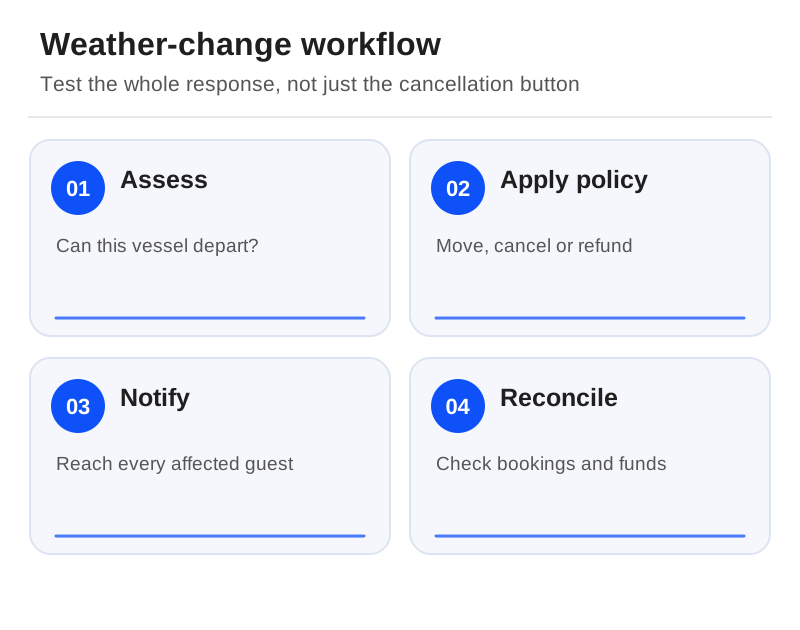
Now recreate the 05:45 decision with test bookings: one fully paid direct guest, one group on a deposit, and one marketplace guest. Cancel the departure. Move one booking, refund another, and leave the third waiting for whatever action the channel requires. As you go, keep a short exception list with the booking reference, who owns the next action, the amount due and whether the customer has been contacted.
One rule matters more than the rest. Close the cancelled or unsafe capacity first, then deal with money and messages. Do not let the boat reappear as available just because refunds have started. And remember that the skipper's call and your safety obligations sit entirely outside the booking system; software records the decision, it does not make it.

At the dock: see what the crew sees
Log in with a crew role on the device that actually goes to the dock. Look for the things that cause trouble at boarding: late additions, two guests with the same surname, infants, extras, and the time of the most recent update. If you plan to use FareHarbor's documented offline check-in, rehearse the preparation before you lose signal and what happens when you reconnect, rather than assuming everything refreshes on its own.[5]
Give access to guest information only to the crew who need it. Agree one fallback manifest and a way to reconcile any changes made on it. Several paper or offline copies quickly become competing passenger counts, and a boat is the last place you want an argument about who is on board.
After the storm: read the refund statement
A month with lots of cancellations exposes costs that a headline price hides. Ask each supplier how booking fees, card processing, partial refunds and marketplace-originated changes are treated. FareHarbor's reviewed public pages do not establish a universal numeric booking rate, and Xola's US card-rate headline is not its full software price, so get the figures in writing.[6][2][7]
Then choose the candidate that passes the vessel-blocking test and handles the weather call at a total cost you can live with. A prettier checkout cannot make up for selling the same boat twice. When you are ready to move, the migration checklist covers carrying deposits and future charters across safely.
Sources
Official documentation supporting this guide. Prices and availability may change; an access date is not a supplier publication date.
- Bookeo Tours & Activities Pricing: official source
- Xola Pricing: official source
- Peek Pro Boat Tour Software: official source
- Bookeo Boat Reservation Software: official source
- Fareharbor Boat Tour Features: official source
- Fareharbor Booking Platform And Onboarding: official source
- Fareharbor Payments: official source
Related guides and tools
Walking and food-tour booking software: guides, guest notes and late changes
Choose around direct sales or distribution, shared guides, current meeting instructions and acknowledged guest requests.
Equipment rental software: compare stock, returns and shared bookings
Booqable and Checkfront lead different rental evaluations: item returns and downtime versus stock shared with activities.
Escape-room booking software: compare private games, reset time and payments
Compare documented game types and group payments, then protect room reset time and game-master availability.
Printable demo and migration checklists · Create a requirements checklist