
Based on public supplier documentation and editorial analysis, not hands-on testing. Confirm current plan features and commercial terms before buying.
At 09:10 a guest replies to her confirmation email: she forgot to mention a sesame allergy. Your tour meets at 10:30. The second stop, a family bakery, starts plating at 10:45. The guide is already on the way to the meeting point.
Whether that message reaches the bakery in time has very little to do with how attractive your booking page is. It depends on how your software connects guests, guides and venues on a working morning. So rather than starting with feature lists, this guide follows a single guest request from booking to tasting plate, and picks software around what that journey needs.
First, match the plan to how you sell
Your sales mix decides which candidate deserves the first trial.
If most guests book on your own website, Bookeo Tours & Activities offers a subscription without booking commissions and a 30-day trial with no card. Its Standard plan's allowance of 1,000 bookings a month counts reservations rather than people, so a family of five uses one booking, not five. Payment processing, text-message credits and digital waivers are separate costs to account for.[5][3]
If resellers matter, look at Bókun. START includes resource management and channel selling with up to five users, and PLUS adds custom booking areas for agents. That gives you a clear upgrade trigger: the day a hotel or concierge partner needs its own selling area.[1]
If you operate in Europe and share guides across several tours, compare Regiondo. It documents staff resources shared across offers. Grow lists channel management, staff and equipment scheduling and up to three users; Pro adds unlimited team members and lets guests change or cancel their own bookings. Its pricing FAQ describes European availability and a one-year contract, so a monthly price there does not mean a month-to-month commitment.[2][4]
Give the guide a handover they can read at a glance
When your guide checks their phone at the meeting point, they need a small number of things: the meeting location, who is guiding and in which language, the booked headcount, any outstanding requests, and when the departure was last updated. Payment disputes and unnecessary personal details do not belong on a sheet that the whole team can see.
Language is where many setups quietly fail. Suppose a bilingual guide leads the morning food walk and can also take a private walking group. Link both products to that guide, then try to create overlapping bookings. A language label on a product does not mean the person who speaks that language is free. Configure the actual guide requirement, and let the software protect it.
Make the allergy message travel
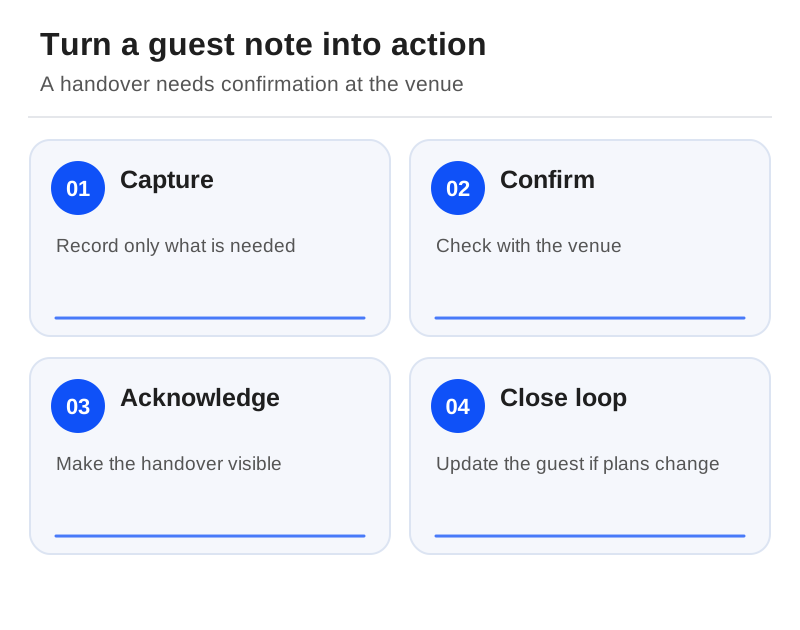
Back to the sesame allergy. Storing it is the easy part. The hard part is turning it into an action someone has confirmed.
Start by collecting only what you need to decide whether you can accommodate the guest and to prepare the service. Set a clear cutoff for requests and explain that adding a note is not a guarantee that a venue can meet it. Uncertain allergies or requirements should go through your agreed procedure, not the guide's best guess.
When a request changes, record four things: the booking reference, the current request, who contacted the venue, and whether the venue acknowledged it. Share the necessary detail with the responsible guide and venue through a restricted channel. Health-related notes should never appear on an open guest list, and a custom field existing is not a reason to collect a guest's broader medical history.

Rehearse the day a restaurant changes
New bookings are easy to demo. Changes are where software shows its character. Create a test departure, then swap one tasting stop and its meeting instructions for that departure only. Check three views: an existing guest's message, a new guest's confirmation and the guide's screen. Every one should show the current information, and no future tour should have changed by accident.
Now repeat with a booking that came through a marketplace. Where the channel limits contact or amendments, put the manual message you still need to send on the departure checklist. None of the broad product pages we reviewed proves that every guest field or itinerary edit flows through every marketplace connection, so test the ones you depend on.
Choose the smallest complete workflow
If Bookeo covers your guide scheduling and guest communication within its allowance, its subscription model is a defensible choice for a tour that sells mostly direct. If distribution and agent selling are essential, compare the right Bókun and Regiondo tiers rather than paying for integrations you will never switch on.[1][2][3]
The final test fits on a sticky note. Take a late booking. Can an ordinary guide find the right guests and the current instructions without scrolling back through a conversation thread? If yes, you have found your system. If not, keep looking. The trial guide shows how to record what you find.
Sources
Official documentation supporting this guide. Prices and availability may change; an access date is not a supplier publication date.
Related guides and tools
Boat and fishing tour software: compare manifests, charters and weather changes
Compare boat-operation features, then rehearse a vessel conflict, a crew handover and a mixed weather cancellation.
Equipment rental software: compare stock, returns and shared bookings
Booqable and Checkfront lead different rental evaluations: item returns and downtime versus stock shared with activities.
Escape-room booking software: compare private games, reset time and payments
Compare documented game types and group payments, then protect room reset time and game-master availability.
Printable demo and migration checklists · Create a requirements checklist