
Based on public supplier documentation and editorial analysis, not hands-on testing. Confirm current plan features and commercial terms before buying.

Pilots do not take off because the plane looks ready. They run through a checklist, and they know in advance what they will do if something fails in the air.
Connecting your inventory to GetYourGuide deserves the same discipline. Once it is live, real guests can buy real places, and a mapping mistake becomes a guest standing at the wrong meeting point or a sold-out departure that is still on sale. This guide covers choosing your system, building the flight plan, running the checks and preparing for the moment something goes wrong.
Choosing your aircraft: Checkfront or Regiondo
Checkfront, for shared stock and mixed durations
Checkfront's integrations directory lists GetYourGuide, and the platform handles shared resources alongside daily, multi-day, timeslot and flexible-time bookings, so it suits, for example, a watersports business that sells activities and rentals from one fleet. On price, Checkfront shows $99/month and a 3% fee on online bookings, with no charge on offline bookings and no additional OTA booking fee listed. Its own page cautions that pricing varies by region and currency.[6][1][3][4]
Regiondo, for European operators who sell admissions too
Regiondo's distribution page names GetYourGuide alongside Viator and local resellers. Grow displays EUR 59/month with channel management, staff and equipment scheduling and a mobile scan app. Step up to Pro, at EUR 99/month, for unlimited users and for guests who can change or cancel their own bookings. Monthly billing comes with a one-year contract, and the page we reviewed does not state the amount of the additional per-online-booking fee.[2][5]
So: if you run a European venue that mixes admissions with marketplace sales, start with the Regiondo tier that covers your staff access and ticket rules. If you need mixed durations and shared stock, start with Checkfront. Neither suggestion means the other platform cannot do those things.
Filing the flight plan: map every option
Before anything connects, build a mapping record. For every option you plan to sell, note your product reference, the GetYourGuide reference, the departure time zone, language, participant categories and selling cutoff. Then note who is allowed to change each field, and whether changes are made in your booking system or in the channel.
Here is where it usually goes wrong. Imagine the same walking route runs in English in the morning and German in the afternoon, with one bilingual guide covering both. Map both options deliberately, and block that guide from an overlapping private booking. Then check what availability the channel shows. Translating a product description does not make a German-speaking guide magically available.
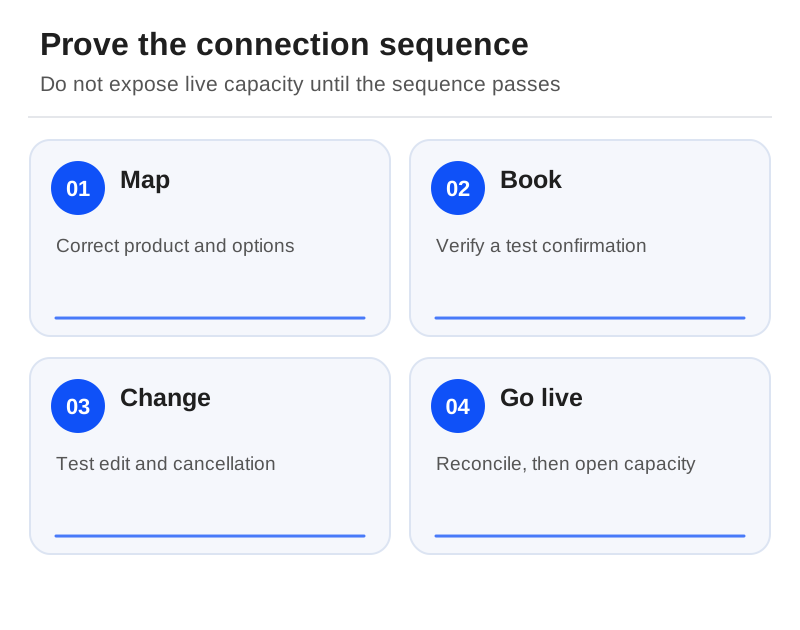
Pre-flight checks: five steps before opening inventory
Step 1: close a date
Close a permitted test date in your source system and confirm that the channel's availability reflects it.
Step 2: reopen and book
Reopen the date, make a supplier-approved test booking, and match the two references.
Step 3: change and cancel
Make a supported amendment and then a cancellation. Each time, check the participant count, resource allocation and customer instructions.
Step 4: follow the money
Inspect the financial record and agree who refunds the guest.
Step 5: simulate a delay
Use the supplier's approved method to simulate a delayed update, and follow their recovery instructions.
This is a test we propose for operators; we have not run it ourselves. Write down what happened and when. A timestamped result is worth more than any claim that the connection is instant.

The emergency card: keep it next to the desk
When something fails, staff need a procedure, not improvisation. Record the last confirmed state and check whether a booking already exists before retrying a failed action. Name who can close sales, who contacts channel support and who tells the guide about a late change. If inventory is in conflict and unresolved, follow your agreed stop-sale procedure rather than letting staff keep two contradictory calendars.
Also find out which guest details transfer and which you can only see in your marketplace account. Collect only what you need to run the experience. An untested mapping is not a reason to build an unrestricted copy of your customer database.
The fine print: read the connector quote alongside the marketplace contract
Ask whether activation or plan changes add charges, what exactly the software fee applies to and who collects payment. A platform saying it adds no OTA fee does not waive GetYourGuide's commission or change your contract's cancellation terms.[1]
Then choose once one representative product has completed all five checks, including an exception. Regiondo's documented focus on Europe and Checkfront's region-dependent pricing make your country and payment eligibility part of the sign-off. Anything the connection cannot do should be listed as manual work with a named owner, not marked as automatic or impossible. Selling on Viator too? Our Viator integration guide follows a booking through that connection.[1][2]
Sources
Official documentation supporting this guide. Prices and availability may change; an access date is not a supplier publication date.
Related guides and tools
Viator integration software: compare fees, mappings and booking changes
Separate the connector fee from Viator commission and follow a mapped reservation through amendments and settlement.
Printable demo and migration checklists · Create a requirements checklist