
Based on public supplier documentation and editorial analysis, not hands-on testing. Confirm current plan features and commercial terms before buying.
Every booking software's website has a row of logos, and Viator is usually one of them. The logo tells you a connection exists. It tells you nothing about what happens on the Tuesday when a guest changes their party from four to three, the vessel they booked is needed for a private charter, and the refund has to match a commission statement that arrives a month later.
So instead of comparing logos, this guide follows one Viator reservation through its whole life: before it exists, the moment it arrives, when it changes, and when the money finally settles. Along the way you will see what to ask each supplier, starting with what they charge to make the connection.
The connectors, and what they cost
Bókun documents importing experiences from Viator and managing availability across channels. Its START, PLUS and PREMIUM plans exempt Viator bookings from Bókun booking fees. Its standalone Channel Manager is different: it lists a 0.5%-1.5% fee on Viator reservations, so if you are keeping another reservation system, you are comparing a different product. Viator's own commission applies in every case.[1][2]
Rezdy documents Viator among its reseller connections and offers channel-management access either with its booking software or alongside an existing platform. Regiondo names Viator on its distribution page and describes availability updates after a Viator reservation. Checkfront's integration directory lists Viator with real-time availability.[6][3][4][5]
The fee statements need careful reading. Regiondo's reviewed pricing lists a per-online-booking fee without stating the amount. Checkfront's pricing says there is no additional OTA booking fee. Those statements cover different things, so ask for a quote based on your channel mix and keep the software's charge separate from the marketplace's.[7][8]
Before the booking exists: decide who is in charge
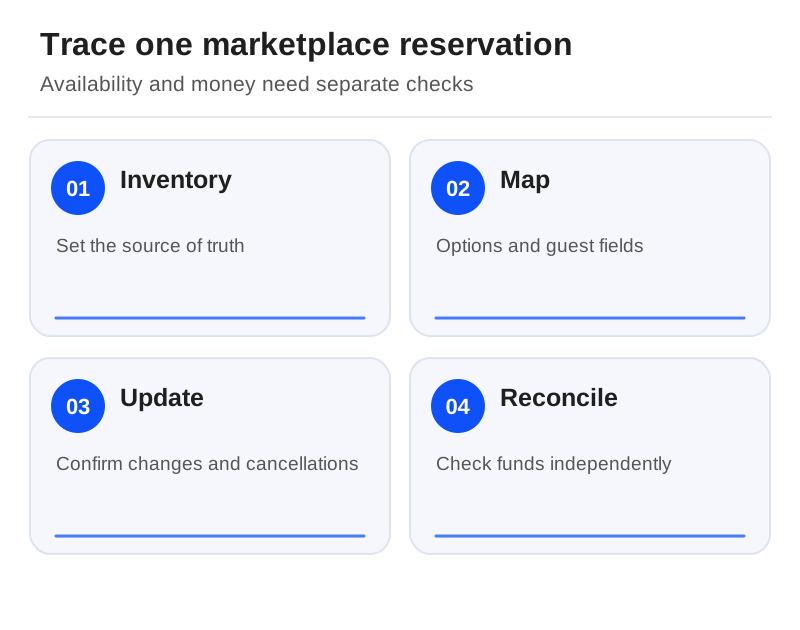
Every connected setup needs one system that holds the truth about availability. Write down which one it is, and how it updates Viator. If a guide or vessel is also sold direct, both sales paths must draw on the same inventory. Two independently managed sellable quantities only work if the supplier has deliberately designed that split.
Picture a public boat trip and a private charter that share one vessel. Connect the public trip through the approved process, then book the charter in your booking system. Check what becomes unavailable on Viator, and how quickly. "Real-time sync" in a sales page is not a guaranteed maximum delay, and it does not prove how every private-product setup behaves.
The moment it arrives: is it the right product?
When a booking lands, it has to match the right product option. For each one, record your product ID and Viator's product and option reference, the language, the local departure time, the participant categories and the cutoffs. Find out what happens when an option is renamed or one date's schedule changes. Keep both references on the staff record, so a failed update can be traced back.
Ask only for the guest information you need to run the experience, and find out which fields arrive in your booking system and which can only be seen or changed in the channel. If a field goes missing during your test, it may be a mapping or permission issue, so check before you conclude the whole product cannot do it.

When it changes: watch both screens
Using the supplier's approved testing or a supervised demonstration, confirm a booking, amend a permitted detail and then cancel it. After each step, compare both references, the guest count, resource availability, messages and the financial status. Note which system starts each change and who handles any amendment the connection does not support.
Keep an exception log with the latest confirmed state, who owns the next action and the channel contact. If a message fails, check whether the reservation already exists before you try again. Blind retries are how duplicate bookings and contradictory guest instructions are born.
When the money settles: reconcile separately
A cancelled place going back on sale does not mean the refund or commission adjustment has gone through. Reconcile the booking value, marketplace commission, software fee and settlement reference against the relevant statements. And agree in advance who answers the guest if your screen and the marketplace's disagree.
Where to begin
If Viator drives your business and you are replacing your booking system, start with Bókun's booking plans. If you are keeping your current booking engine, compare the separate connector offers from Bókun and Rezdy. Add Regiondo or Checkfront when their wider European or shared-resource workflows fit how you operate. No source we reviewed shows any one connector handling every amendment faster than the others, so let your own booking's life story decide. For the GetYourGuide side of your distribution, see our GetYourGuide connection guide.[1][8][9][5]
Sources
Official documentation supporting this guide. Prices and availability may change; an access date is not a supplier publication date.
- Bókun Pricing And Channel Manager Terms: official source
- Bókun And Viator: official source
- Checkfront Integration Directory: official source
- Regiondo Distribution Channels: official source
- Rezdy Channel Manager: official source
- Rezdy Booking Software: official source
- Checkfront Pricing: official source
- Regiondo Grow And Pro Pricing: official source
- Checkfront Features: official source
Related guides and tools
GetYourGuide integration software: choose and check the connection
Compare Checkfront and Regiondo, map the actual product options and agree how failed updates will be recovered.
Printable demo and migration checklists · Create a requirements checklist